
In this article
The VMware Compatibility Guide is a valuable resource for ensuring that your hardware, software, and VMware products are compatible with each other. It allows you to check if specific components such as servers, storage devices, network adapters, and guest operating systems are supported by VMware’s virtualization platforms. before starting the installation
You may want to check out How-to: Install and Configure VMware ESXi 7.0 | Best Practices
Here’s how you can use the VMware Compatibility Guide:
1- Accessing the Guide:
- Go to the VMware Compatibility Guide website: VMware Compatibility Guide
- You can search for compatibility information based on the VMware product you are using, such as vSphere, vSAN, NSX, or VMware Cloud Foundation.
2- Search for Compatibility:
- To check compatibility, select the VMware product you are interested in from the dropdown menu.
- Enter the specific component you want to check, such as server model, storage controller, network adapter, or guest operating system.
- You can also filter by vendor, product release version, and other criteria to narrow down your search.
3- Viewing Compatibility Results:
- Once you’ve entered your search criteria, the compatibility results will be displayed.
- You will see a list of compatible components along with detailed information such as the vendor, product name, version, and compatibility status.
- Green checkmarks typically indicate full compatibility, while caution symbols may indicate partial compatibility or specific considerations.
4- Example Usage:
- Let’s say you’re planning to upgrade your ESXi hosts to a newer version. Before doing so, you want to ensure that your server hardware is compatible.
- Go to the VMware Compatibility Guide and select “vSphere (ESXi)” as the VMware product.
- Enter the model of your server (e.g., Dell PowerEdge T320) in the search field.
- Filter the results by the ESXi version you plan to Install/upgrade to.
- Review the compatibility information provided. Ensure that the server model, firmware version, and other components like network adapters and storage controllers are compatible with the ESXi version you intend to install.
Example1 : PowerEdge T320 | VMware compatibility
- Manufacturer: Dell Inc.
- Model: PowerEdge T320
- Processor Type: Intel(R) Xeon(R) CPU E5-2407 @ 2.20GHz
- Logical Processors: 4
- Sockets: 1
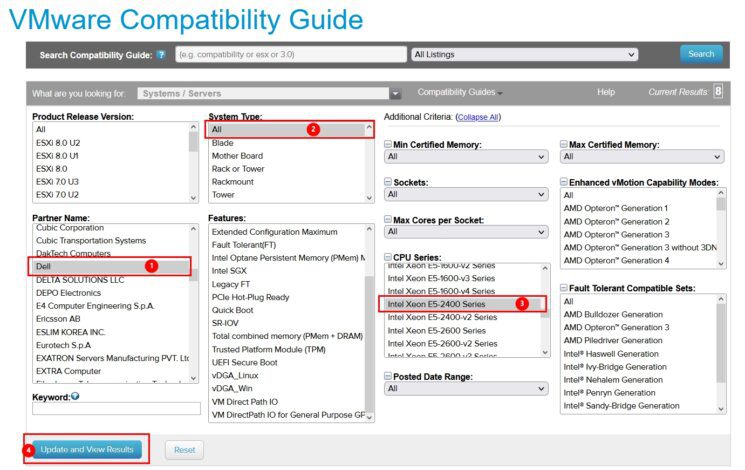
- In the “Partner Name” dropdown menu, select “Dell” to filter the search results to Dell hardware compatibility.
- In the “CPU Series” or “CPU Model” field, type “Intel Xeon E5-2400” or a similar description to narrow down the search to the specific CPU model you’re interested in
- Once you’ve specified the partner name, CPU model, and VMware product version, click on the “Update and View Results” button to initiate the search..
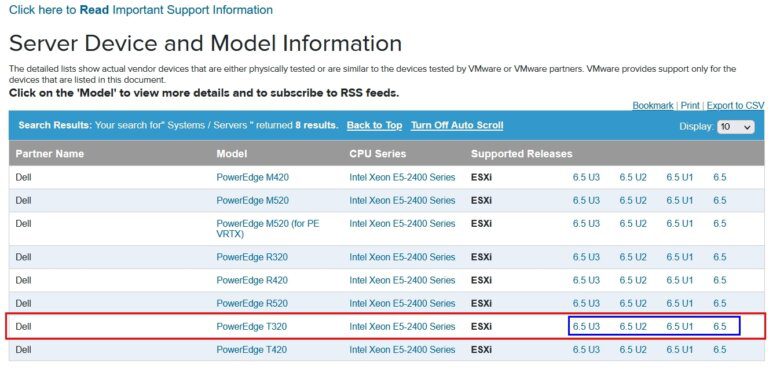
- The Compatibility Guide will display the compatibility status of the Intel Xeon E5-2400 CPU with the selected VMware product on Dell hardware.
- It will indicate whether the CPU is compatible with vShpere ESXI 6.5U3, 6.5U2, 6.5U1, 6.5 only

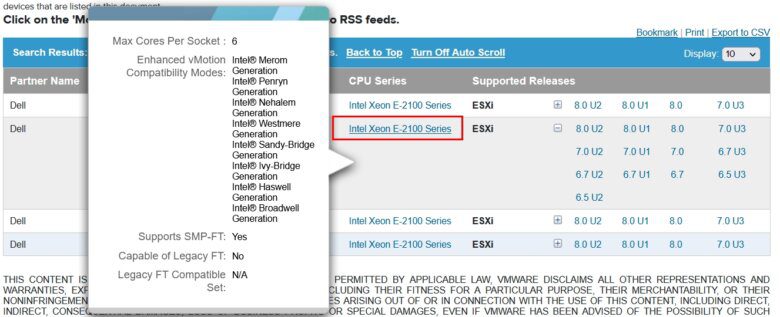
- When you hover your mouse over the server model, a pop-up will appear in which more information about it will appear
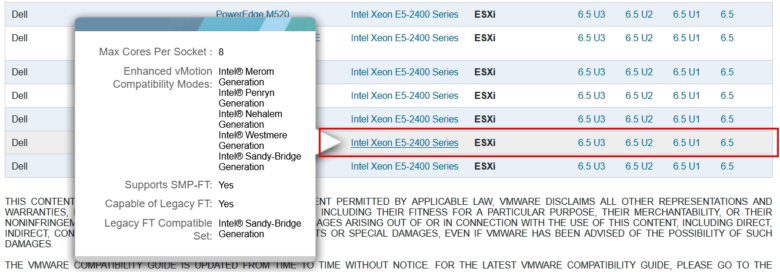
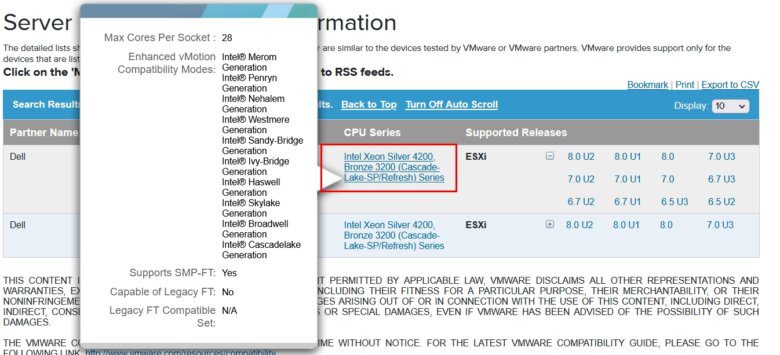
- When you hover your mouse over the CPU, a pop-up will appear in which more information about it will appear
Example2 : PowerEdge R340 | VMware compatibility
- Manufacturer: Dell Inc.
- Model: PowerEdge R340
- Processor Type: Intel(R) Xeon(R) E-2146G CPU @ 3.50GHz
- Logical Processors: 6
- Sockets: 1
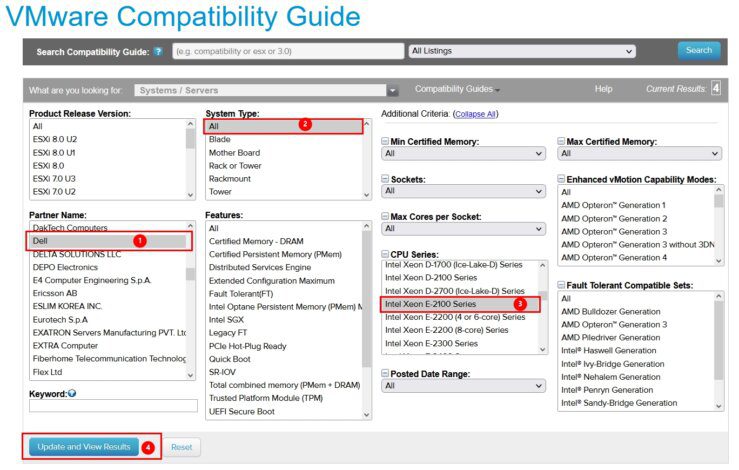
- In the “Partner Name” dropdown menu, select “Dell” to filter the search results to Dell hardware compatibility.
- In the “CPU Series” or “CPU Model” field, type “Intel Xeon E5-2100” or a similar description to narrow down the search to the specific CPU model you’re interested in
- Once you’ve specified the partner name, CPU model, and VMware product version, click on the “Update and View Results” button to initiate the search..
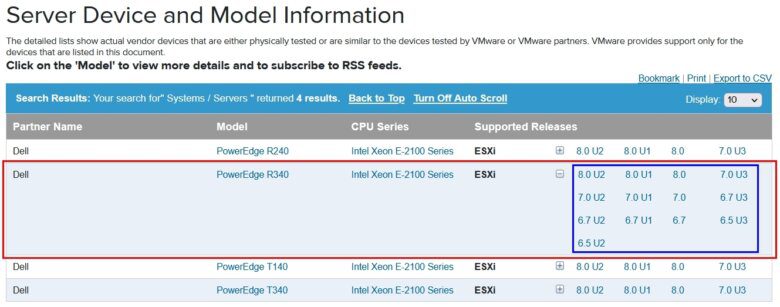
- The Compatibility Guide will display the compatibility status of the Intel Xeon E5-2100 CPU with the selected VMware product on Dell hardware.
- It will indicate whether the CPU is compatible with vShpere ESXI Starting from 6.5U2 To 8.0U2

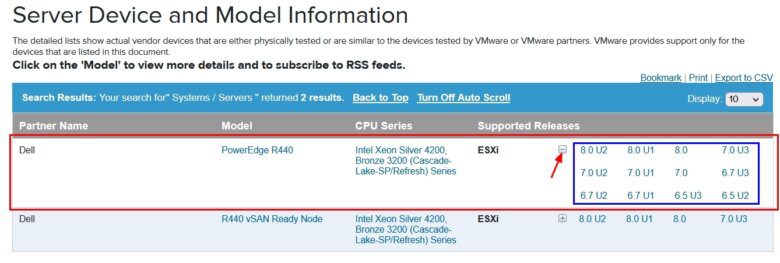
Example3 : PowerEdge R440 | VMware compatibility
- Manufacturer: Dell Inc.
- Model: PowerEdge R440
- Processor Type: Intel(R) Xeon(R) Silver 4214 CPU @ 2.20GHz
- Logical Processors: 48
- Sockets: 2
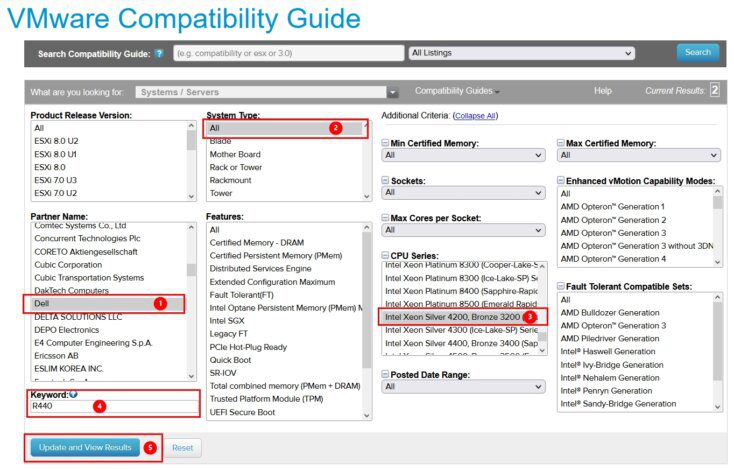
- We can use keyword for more filter

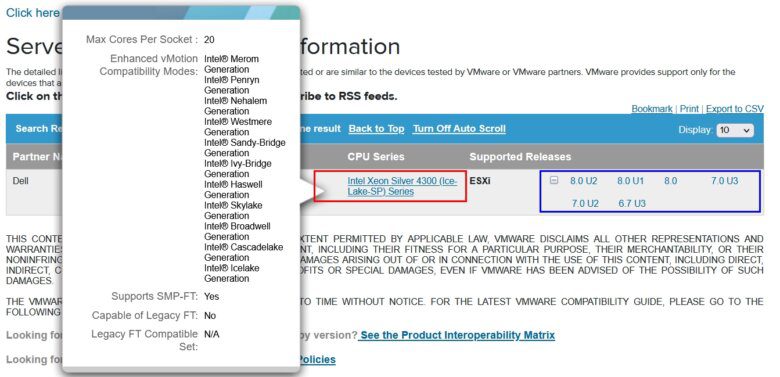
Example4 : PowerEdge R750xs | VMware compatibility
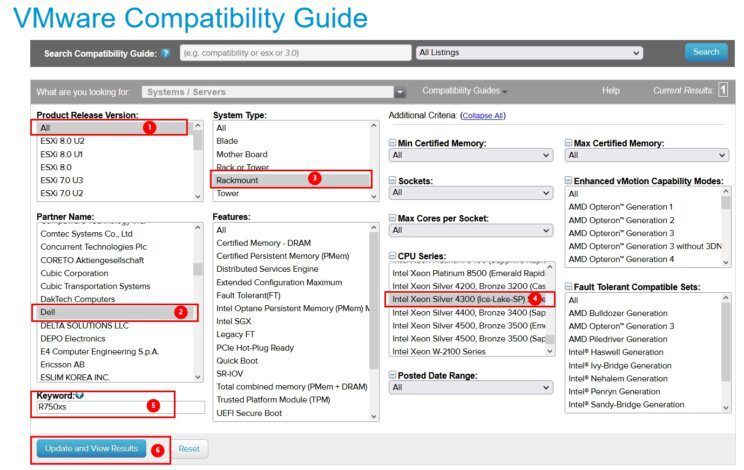
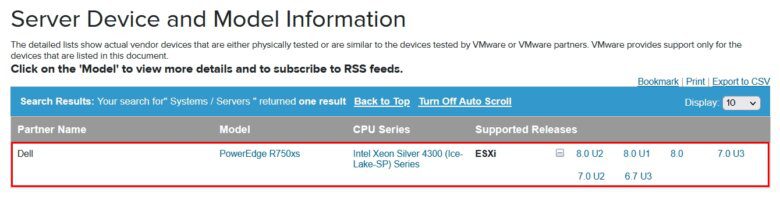
- Manufacturer: Dell Inc.
- Model: PowerEdge R750xs
- Processor Type: Intel(R) Xeon(R) Silver 4310 CPU @ 2.10GHz
- Logical Processors: 48
- Sockets: 2

5- Additional Considerations:
- It’s essential to review release notes, compatibility matrices, and documentation provided by VMware for specific requirements and considerations.
- Always verify compatibility with your specific use case and environment before making any changes or upgrades.
- In addition to the server model, you may want to check the compatibility of other components such as RAID controllers, network adapters, and storage devices if they are critical to your VMware deployment.
By using the VMware Compatibility Guide effectively, you can make informed decisions about your virtualization infrastructure, minimize compatibility issues, and ensure a smooth deployment and operation of VMware products.